Graph API (low level)
Every workflow — YAML or Flow — compiles down to the same runtime
Graph: a dictionary of nodes and an explicit list of edges. YAML and the
Flow builder are views over it; the Graph API is the layer underneath
that lets you hand-wire everything when you need full control.
YAML ─┐
Flow ─┼─► Graph ──► run() / stream()
Reach for the Graph API when you want:
- a custom
Nodesubclass with imperative logic, - edges computed at build time (loops over state keys, generated cases),
- hooks,
Commandrouting, or__error__edges spelled out by hand, - zero sugar — every node and every arrow visible.
The shape
A Graph is three things: a nodes dict, an edges list, and an
entry_point:
from teff.graph import Edge, Graph
from teff.node import Transform

graph = Graph(
    nodes={
        "count": Transform(action="count_lines", input_key="text", output_key="lines"),
        "single": Transform(
            action="value", value="single-line note", output_key="note"
        ),
        "multi": Transform(action="value", value="multi-line note", output_key="note"),
        "status": Transform(action="value", value="done", output_key="status"),
    },
    edges=[
        Edge("count", "single", "lines=1"),
        Edge("count", "multi", "lines!=1"),
        Edge("single", "status"),
        Edge("multi", "status"),
    ],
    entry_point="count",
)

result = await graph.run(state={"text": "two\nlines"})
print(result["note"])  # multi-line note
run() starts at entry_point, follows every edge whose condition matches
the current state, and shallow-merges each node's output back into the state
dict. Entry nodes are runnable: await graph.run({...}) runs entry_point.
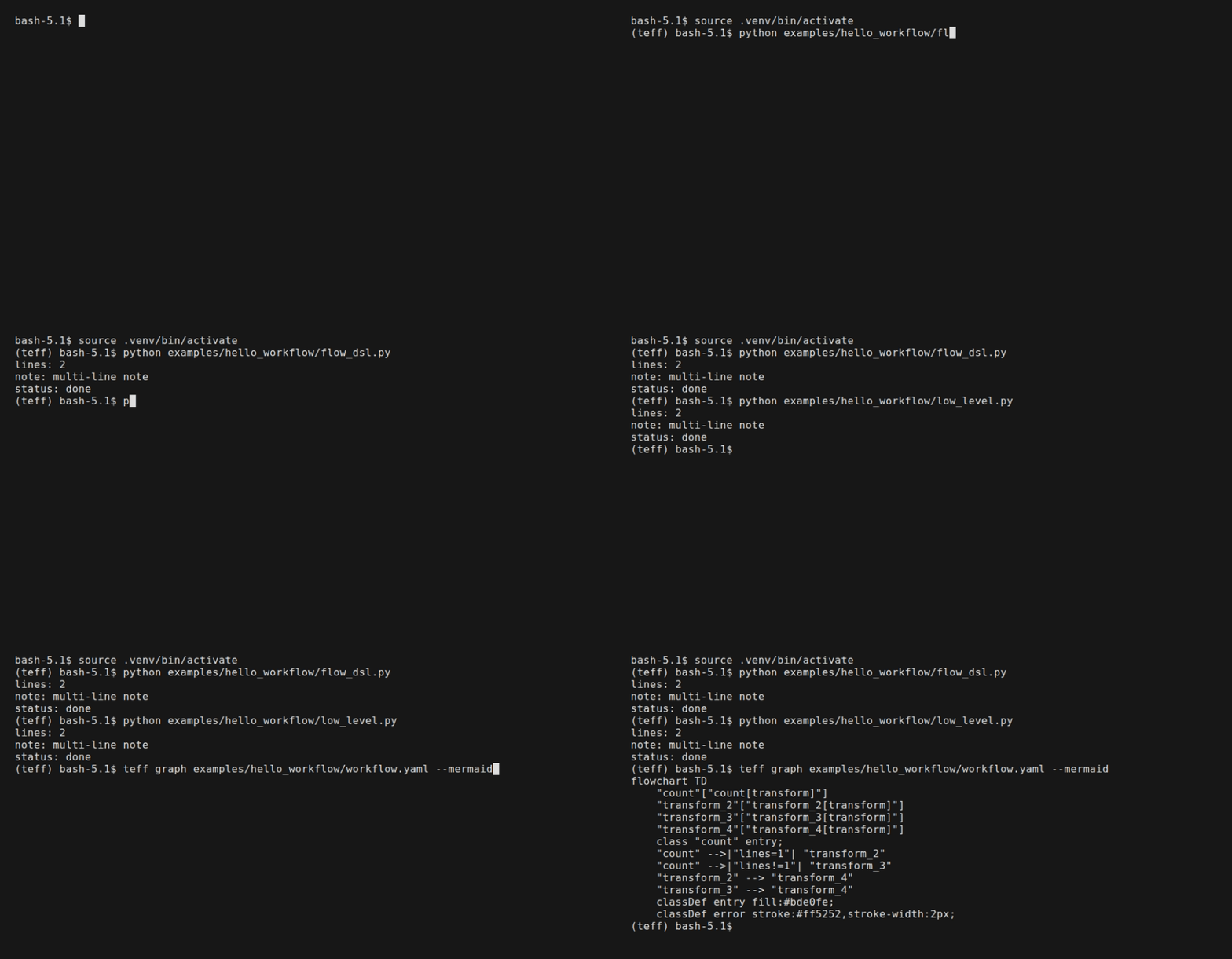
The same workflow at both levels — the Flow builder vs the hand-wired
Graph — then rendered as Mermaid (hello_workflow example):
Flow builder vs Graph API vs rendered graph (hello_workflow example) |
|---|
 |
Edges
An Edge(source_id, target_id, condition=None) is unconditional by default;
with a condition it routes on the state:
| Condition | Routes when |
|---|---|
"key=value" |
state["key"] == value |
"key!=value" |
state["key"] != value |
"key=a,b" |
state["key"] is a or b (comma = OR) |
"key>=N" / "key<=N" / "key>N" / "key<N" |
numeric comparison |
callable(state) -> bool |
arbitrary predicate (cannot be serialized) |
"__error__" |
the source node raised an exception |
Edge("parse", "retry", "__error__")  # catch failures
Edge("route", "done", lambda s: "ok" in s.get("status", ""))  # arbitrary check
Custom nodes
A node is an async function (ctx, state) -> dict | Command returning the
state updates to apply. Two ways to make one:
Function node
from teff.node import Command


async def classify(ctx, state):
    if "bad" in state["text"]:
        return Command(update={"blocked": True}, goto=Command.STOP)
    if "trusted" in state["text"]:
        return Command(update={"cleared": True}, goto="deliver")
    return {"cleared": True}  # fall through to normal edges
Build a Node from it with make_function_node, or subclass Node:
from teff.node import Node


class MyNode(Node):
    type = "my_node"

    async def execute(self, ctx, state):
        return {"answer": state.get("text", "")[::-1]}
graph = Graph(
    nodes={"my": MyNode()},
    edges=[Edge("my", "end")],
    entry_point="my",
)
goto in a Command may target any node id — it does not need an edge —
and Command.STOP ends the run. See Command routing.
Where the abstraction lives
| Concern | YAML / Flow |
Graph API |
|---|---|---|
| Declaring nodes | steps: / .step() |
nodes= dict |
| Arrows & conditions | edges: / .branch() / .route() |
Edge(..., condition) list |
| Custom node logic | @node decorator |
Node subclass / function |
| Dynamic routing | Command from any node |
same — the runtime primitive |
| Serializing to YAML | flow.to_yaml() |
graph_to_yaml(graph) |
The Graph API shares one runtime with YAML and Flow — a graph built by
hand runs through the same engine, checkpointer, tools and hooks as one loaded
from a file:
from teff.yaml import graph_to_yaml

yaml_text = graph_to_yaml(graph)  # export a hand-wired graph
See also
- Tutorial — the same workflow at all three
levels (YAML,
Flow,Graph). - Choosing your abstraction — when to stay at each layer.
- Flow builder — the ergonomic
Flowsurface on top of this. teff.graphandteff.graph.Edgein the API reference.